UE Color Tools Implementation#
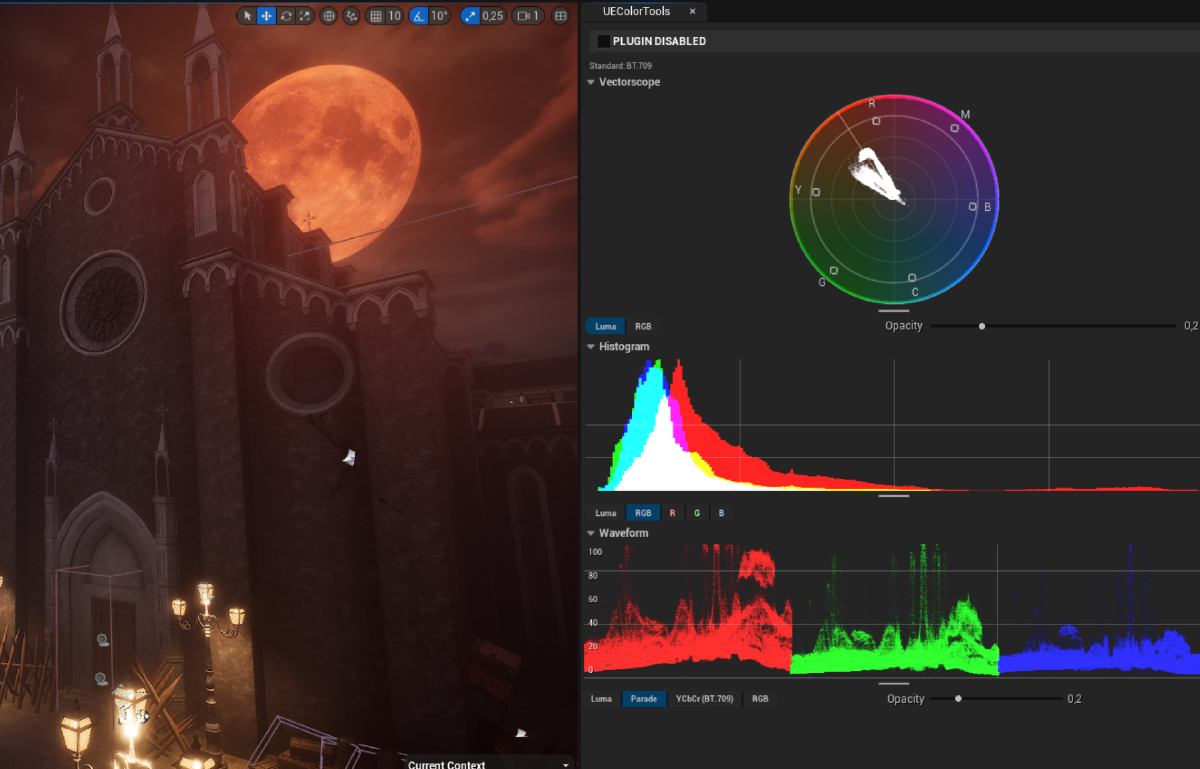
This is a writeup of how I built UEColorTools, a real-time vectorscope, histogram, and waveform monitor that runs inside the Unreal Engine 5 editor. It uses compute shaders and the Render Dependency Graph (RDG) to sample the viewport every frame and draw broadcast style scopes into Slate widgets.
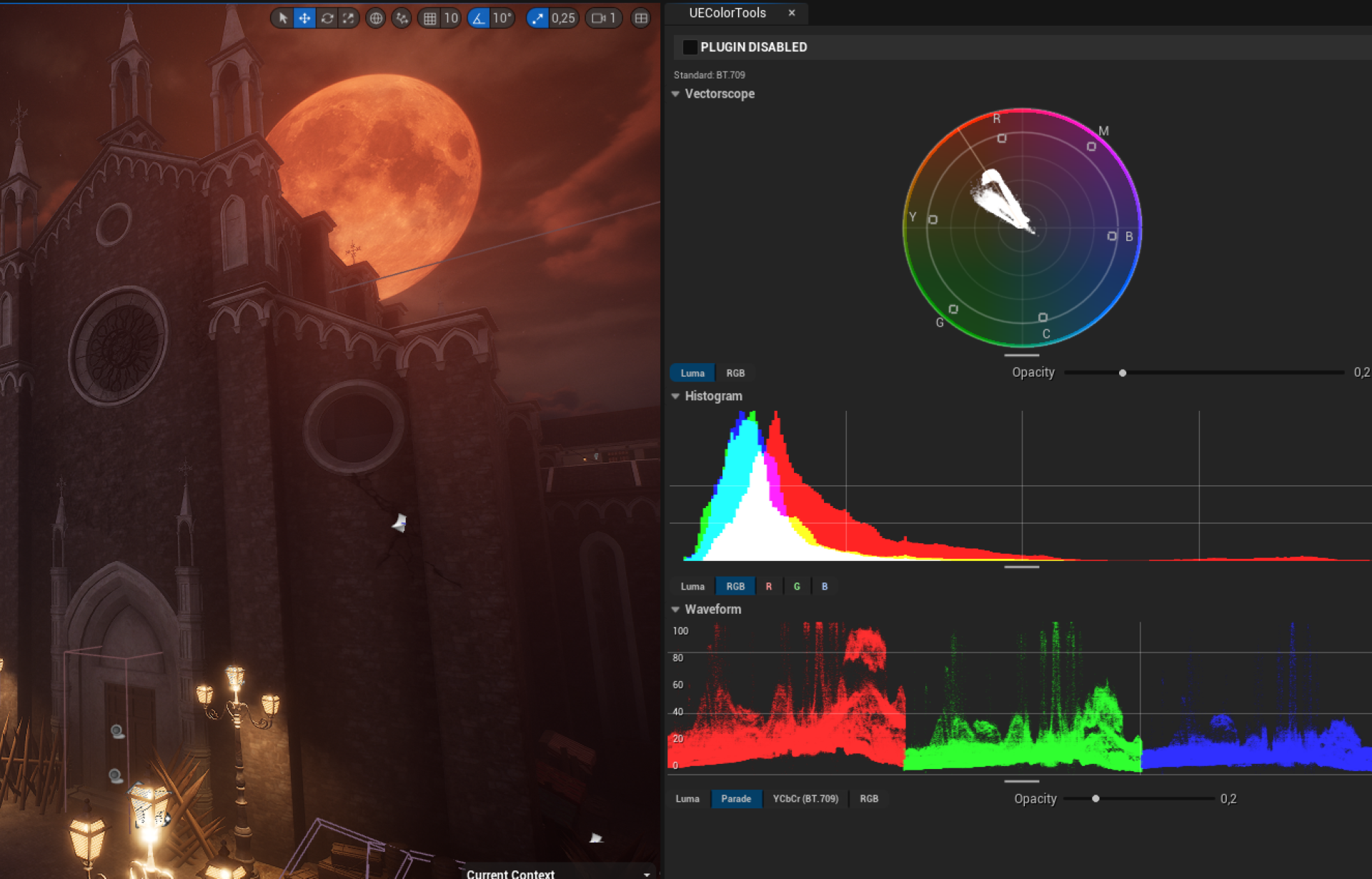
The reason I wanted to write this down is that maybe half of what I had to figure out is not really documented anywhere I could find. The UE source code is a big part of the documentation I used, and even that takes a lot of staring at to make sense of. So this article is mostly a record of the non-obvious things I had to figure out.
Using the Scene View Extension#
The FSceneViewExtension is Unreal’s official way to inject your own work into the rendering pipeline without forking the engine. You inherit from FSceneViewExtensionBase, override the hooks you care about, and the engine calls your code on the render thread at the right moments.
A view extension is reference counted, so if nothing holds onto it, it dies the moment you create it. I solved this with an UEngineSubsystem:
void UUEColorToolsSubsystem::Initialize(FSubsystemCollectionBase& Collection)
{
    Super::Initialize(Collection);
    UEColorToolsViewExtension = FSceneViewExtensions::NewExtension<FUEColorToolsViewExtension>();
}

void UUEColorToolsSubsystem::Deinitialize()
{
    Super::Deinitialize();
    UEColorToolsViewExtension.Reset();
    UEColorToolsViewExtension = nullptr;
}
FSceneViewExtensions::NewExtension<T>() registers the extension with the engine and hands you back a TSharedPtr. The subsystem holds it for the lifetime of the editor.
An important note: the signature of SubscribeToPostProcessingPass changed between 5.3 and 5.4. In 5.3 it was:
virtual void SubscribeToPostProcessingPass(
    EPostProcessingPass Pass,
    FAfterPassCallbackDelegateArray& InOutPassCallbacks,
    bool bIsPassEnabled) override;
In 5.4+ they added a const FSceneView& parameter:
virtual void SubscribeToPostProcessingPass(
    EPostProcessingPass Pass,
    const FSceneView& InView,
    FAfterPassCallbackDelegateArray& InOutPassCallbacks,
    bool bIsPassEnabled) override;
I have a preprocessor guard for this:
#if ENGINE_MAJOR_VERSION == 5 && ENGINE_MINOR_VERSION > 4
void FUEColorToolsViewExtension::SubscribeToPostProcessingPass(
    EPostProcessingPass InPass, const FSceneView& InView,
    FAfterPassCallbackDelegateArray& OutPassCallbacks, bool bInIsPassEnabled)
#else
void FUEColorToolsViewExtension::SubscribeToPostProcessingPass(
    EPostProcessingPass InPass,
    FAfterPassCallbackDelegateArray& OutPassCallbacks, bool bIsPassEnabled)
#endif
The FPostProcessMaterialInputs header also moved between versions, so the includes in UEColorToolsShaders.h are gated the same way.
Using a post-processing pass#
Once the subscription works, you choose which pass to hook. The available enum values are:
enum class EPostProcessingPass : uint32 {
    SSRInput, MotionBlur, Tonemap, FXAA, VisualizeDepthOfField, MAX
};
This choice actually matters a lot for scopes. A vectorscope or a waveform is supposed to tell you what the viewer is going to see, that is, display-referred values after tonemapping. If I hooked into something pre-tonemap, I would be measuring HDR scene radiance, which has a completely different range and shape and would make the scopes useless for color grading.
So I hook after FXAA, which sits past Tonemap in the chain. The colors I sample are already in the 0-1 display range:
if (InPass == EPostProcessingPass::FXAA)
{
    OutPassCallbacks.Add(FAfterPassCallbackDelegate::CreateRaw(
        this, &FUEColorToolsViewExtension::PostProcessPass_Vectorscope));
    OutPassCallbacks.Add(FAfterPassCallbackDelegate::CreateRaw(
        this, &FUEColorToolsViewExtension::PostProcessPass_Histogram));
    OutPassCallbacks.Add(FAfterPassCallbackDelegate::CreateRaw(
        this, &FUEColorToolsViewExtension::PostProcessPass_Waveform));
}
The callback receives an FPostProcessMaterialInputs from which I pull the scene color:
const FScreenPassTextureSlice SceneColorSlice =
    InInputs.GetInput(EPostProcessMaterialInput::SceneColor);

FScreenPassTexture SceneColorTexture(SceneColorSlice);
if (!SceneColorTexture.IsValid() ||
    !EnumHasAnyFlags(SceneColorTexture.Texture->Desc.Flags, TexCreate_ShaderResource))
{
    return; // SRV flag missing - cannot create a shader resource view
}

FRDGTextureSRVRef SceneColorSRV = GraphBuilder.CreateSRV(SceneColorTexture.Texture);
Two things worth noting here. First, you absolutely must check the TexCreate_ShaderResource flag. There are passes where the scene color is delivered as a write-only target and creating an SRV from it crashes. Second, the callback has to return a value: InInputs.ReturnUntouchedSceneColorForPostProcessing(GraphBuilder). Even if you only want to read the scene, the engine treats the callback as a transform in the chain.
You can only get the viewport rectangle by casting FSceneView to FViewInfo. FViewInfo is in a private header (Runtime/Renderer/Private), so you cannot include it normally. I added the path to UEColorTools.Build.cs:
string EnginePath = Path.GetFullPath(Target.RelativeEnginePath);
PublicIncludePaths.Add(EnginePath + "Source/Runtime/Renderer/Private");
Then the cast works:
const FIntRect ViewportRect = static_cast<const FViewInfo&>(View).ViewRect;
This is the only way I found to get the rendered region’s pixel size on the render thread. The scene color texture is allocated at a power of two aligned extent that is larger than the visible viewport, so without ViewRect you would dispatch threads over a region full of garbage outside the viewport.
Dispatching compute shaders#
Each scope follows the same overall RDG structure: register an external texture for output, create transient accumulation resources, run two or three compute passes, and queue the result back to the pool. The general skeleton:
// 1. Bridge our UTextureRenderTarget2D into RDG as a pooled target (once).
if (!VectorscopePooledRenderTarget.IsValid())
{
    InitializeExternalBuffer_RenderThread(
        ColorToolsModule->RT_Vectorscope, VectorscopePooledRenderTarget);
}

// 2. Wrap the pooled target as an RDG-tracked texture for this frame.
FRDGTextureRef OutputTexture = GraphBuilder.RegisterExternalTexture(
    VectorscopePooledRenderTarget, TEXT("Vectorscope.Output"));
FRDGTextureUAVRef OutputUAV = GraphBuilder.CreateUAV(FRDGTextureUAVDesc(OutputTexture));

// 3. Create transient per-channel accumulation textures (R, G, B, A).
FRDGTextureDesc AccDesc = FRDGTextureDesc::Create2D(
    OutputSize, PF_R32_UINT, FClearValueBinding::Black,
    TexCreate_ShaderResource | TexCreate_UAV);
FRDGTextureRef AccR = GraphBuilder.CreateTexture(AccDesc, TEXT("Vectorscope.AccumulationR"));
// ... G, B, A
AddClearUAVPass(GraphBuilder, AccumulationUAV_R, FUintVector4(0, 0, 0, 0));
// ... clear the rest

// 4. Dispatch passes ( render background -> accumulate plots -> normalize values).

// 5. Queue extraction so the next frame can read the output.
GraphBuilder.QueueTextureExtraction(OutputTexture, &VectorscopePooledRenderTarget);
The bridge from UTextureRenderTarget2D to a pooled render target is its own little ritual. The render target is a regular UObject the Slate UI binds to its brush, but RDG only wants IPooledRenderTarget.
FTextureRHIRef TextureRHI =
    InSourceRenderTarget->GetRenderTargetResource()->TextureRHI;

ETextureCreateFlags BufferFlags =
    TexCreate_ShaderResource | TexCreate_UAV | TexCreate_RenderTargetable;

FPooledRenderTargetDesc PooledDesc = FPooledRenderTargetDesc::Create2DDesc(
    RenderTargetResource->GetSizeXY(),
    TextureRHI->GetFormat(),
    FClearValueBinding::Transparent,
    BufferFlags, TexCreate_None, false);

FSceneRenderTargetItem TargetItem;
TargetItem.TargetableTexture = TextureRHI;
TargetItem.ShaderResourceTexture = TextureRHI;

GRenderTargetPool.CreateUntrackedElement(PooledDesc, OutPooledRenderTarget, TargetItem);
Note CreateUntrackedElement, not FindFreeElement. We are reusing an already-allocated RHI texture, not asking the pool to give us one. The render target is allocated CPU side in UTextureRenderTarget2D and we just want RDG to know about it. The flags bCanCreateUAV = true and InitCustomFormat(W, H, PF_A32B32G32R32F, false) on the render target are also mandatory. Without UAV support you cannot write to it from a compute shader, and without an actual float format you lose HDR precision in the visualization.
The other essential bit is the shader directory mapping. HLSL files in the plugin live under <plugin>/Shaders/, but #include and the engine’s shader compiler need a virtual path. I register it on module startup:
FString ModuleShaderDir = FPaths::Combine(PluginDir, TEXT("Shaders"));
if (FPaths::DirectoryExists(ModuleShaderDir))
{
    AddShaderSourceDirectoryMapping(TEXT("/UEColorTools"), ModuleShaderDir);
}
Then IMPLEMENT_SHADER_TYPE can refer to "/UEColorTools/Vectorscope.usf" and it resolves correctly.
One last shader thing: OutEnvironment.CompilerFlags.Add(CFLAG_AllowTypedUAVLoads);. This is required if you want to read from a typed UAV like RWTexture2D<uint> inside the same shader that writes to it and that is exactly what my normalize passes do.
Making the tools#
Some color theory#
The math underneath all three scopes is Rec. 709 luminance and chrominance. From the tonemapped scene color:
- Luma (Y’):
Y' = 0.2126 * R + 0.7152 * G + 0.0722 * B - Chrominance (Cb, Cr):
Cb = (B - Y') / 1.8556,Cr = (R - Y') / 1.5748The luma weights are weighted by perceived brightness. Green dominates because human vision is most sensitive to it. Cb(blue minus luma) and Cr(red minus luma) are scaled so they sit in roughly the same range as Y'.
A vectorscope plots Cb on X and Cr on Y, ignoring luma. It tells you about hue (angle) and saturation (radius), nothing about brightness.
A histogram counts how many pixels fall into each value bucket per channel, purely statistical, no spatial info.
A waveform plots a single channel (or all three) as column -> value so each column of the screen becomes a vertical strip of dots in the scope, preserving horizontal position. Each one trades off different axes of information.
The reference targets on the vectorscope, the little boxes labeled R, G, B, C, M, Y, sit at 75 % saturation. That is the broadcast convention from SMPTE color bars, not 100 %, because 100 % primaries can clip and the 75 % target gives some headroom. There is also the “skin tone line” at about 123°, which is the locus of skin tones across most ethnicities.
Vectorscope#
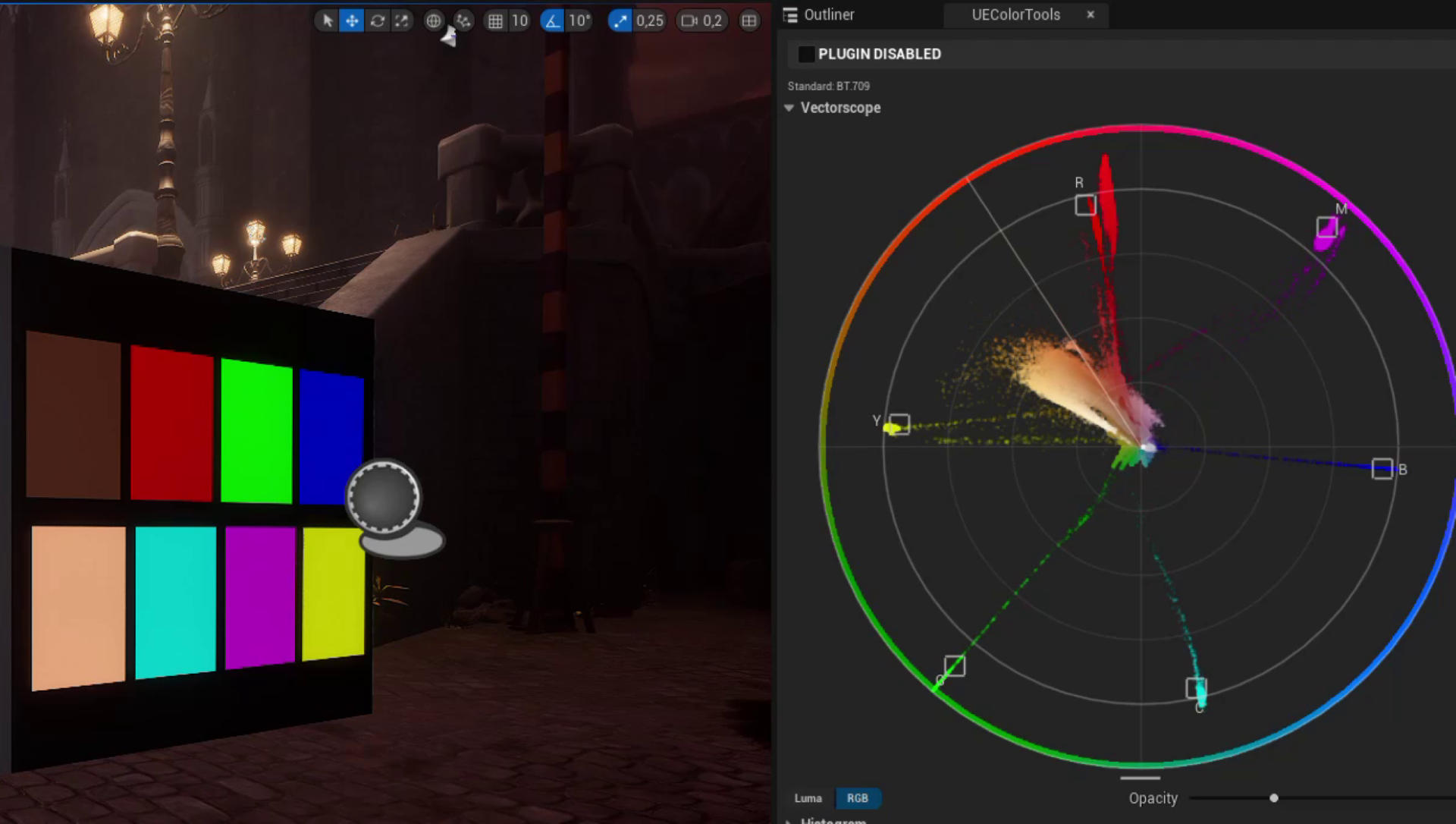
The vectorscope is three compute passes, but the most interesting bit is what each one actually draws.
Pass 1: VectorscopeCS: the gamut disc itself. The colored background of a vectorscope is not a sprite or a baked texture. It is the gamut, plotted live. For every output pixel I treat its position as a (Cb, Cr) coordinate, fix Y at 0.35 (a midtone), and run the inverse YCbCr -> RGB conversion. The result is the color that would land at that location. Pixels outside the unit circle get zeroed:
float2 uv = (DispatchThreadID.xy / 800.0f) * 2.0 - 1.0;
float cb =  uv.x * 0.5;
float cr = -uv.y * 0.5;
float radius = length(uv);

if (radius > 1) { FinalOutputTexture[DispatchThreadID.xy] = 0; return; }

const float innerRadius = 1 - 0.02 * (400 / min(400, ScreenSize.x));
bool isInRing = (radius >= innerRadius);

const float y = 0.35;
float3 rgb_gamma = YCbCrToRGB(float3(y, cb, cr));
float3 rgb_linear = pow(saturate(rgb_gamma), 2.2);

float alpha = isInRing ? 1.0 : 0.3;
FinalOutputTexture[DispatchThreadID.xy] = float4(rgb_linear, alpha);
In Luma mode you see the whole disc dim with a brighter rim. In RGB mode (ViewType == 1) only the rim is drawn so the trace stays uncluttered. The graticule itself(rings, target boxes, skin-tone line, labels) is not in the shader. That part is SVectorscopeGraticule, an SLeafWidget that draws lines and text over the texture in Slate. Doing it in Slate means the labels stay crisp when the user resizes the panel and the geometry is independent of the texture resolution.
Pass 2: VSCombineCS: the trace. Every viewport pixel converts itself to YCbCr, computes a position on the scope, and increments a counter there. Three subtle things happen at once.
First, the splat is a box, not a point. If each source pixel only wrote to one scope pixel, the trace would be a sparse cloud of dots. Instead each pixel writes to a small square around its target, with the size adapting to the scope’s window resolution:
int r_size = 2 * (400 / min(400, ScreenSize.x));
int size = clamp(r_size, 1, 8);
Second, the color being written is brightness boosted in HSV space before being scaled to an integer:
float3 hsv = RGBtoHSV(col.rgb);
hsv.z = lerp(hsv.z, 1, 0.5);   // half-way push toward full brightness
col.rgb = HSVtoRGB(hsv);
This is necessary because a vectorscope is read as a hue/saturation chart, not a brightness chart. If the source pixel is a dark navy blue, you still want a visible mark at the blue position. Not a faint trace that disappears against the gamut background. Hue and saturation stay the same, only value goes up.
Third, the atomic-add is guarded by a saturation check on the alpha channel.
if (AccumulationTextureA[uint2(x, y)] < 75 * SCALE)
{
    InterlockedAdd(AccumulationTextureR[uint2(x, y)], fin_col.r);
    InterlockedAdd(AccumulationTextureG[uint2(x, y)], fin_col.g);
    InterlockedAdd(AccumulationTextureB[uint2(x, y)], fin_col.b);
    InterlockedAdd(AccumulationTextureA[uint2(x, y)], fin_col.a);
}
The reason: on a scene with a lot of midtones (which is most scenes) thousands of GPU threads end up trying to atomic-add to the same handful of scope cells near the center. That serialization completely tanks performance. The cap (75 * SCALE, equivalent to about 75 splats worth of accumulation) means that once a cell is clearly “very hot” the threads stop fighting over it, because past that point the trace is going to be at maximum visible intensity anyway.
Pass 3: VSNormalizeCS: turn counts into pixels. Dividing the count by some max and calling it a day produces a horrible looking scope where the rare bright spots clip out and everything else is invisible. The fix is to compress accumulated alpha with a Reinhard-style curve, then alpha-blend the trace over the gamut disc:
float4 accumulated = float4(r, g, b, a) / SCALE;
accumulated.rgb = accumulated.rgb / accumulated.a;  // normalize color by weight
// Reinhard compression: smooth roll-off into [0,1]
accumulated.a = (accumulated.a * Opacity) / (1.0 + accumulated.a * Opacity);
// gamma 2.2, Slate re-applies sRGB on the way out
accumulated.rgb = pow(saturate(accumulated.rgb), 2.2);
float4 fin = lerp(color, float4(accumulated.rgb, 1), accumulated.a);
That last gamma line deserves a callout. The RWTexture2D<float4> I write into is treated as sRGB by Slate when it renders the brush. So anything I write at gamma 1.0 gets darkened on display. Applying pow(rgb, 2.2) here cancels the gamma Slate adds back. I found this empirically by wondering why my saturated reds looked like maroons in the panel.
Histogram#
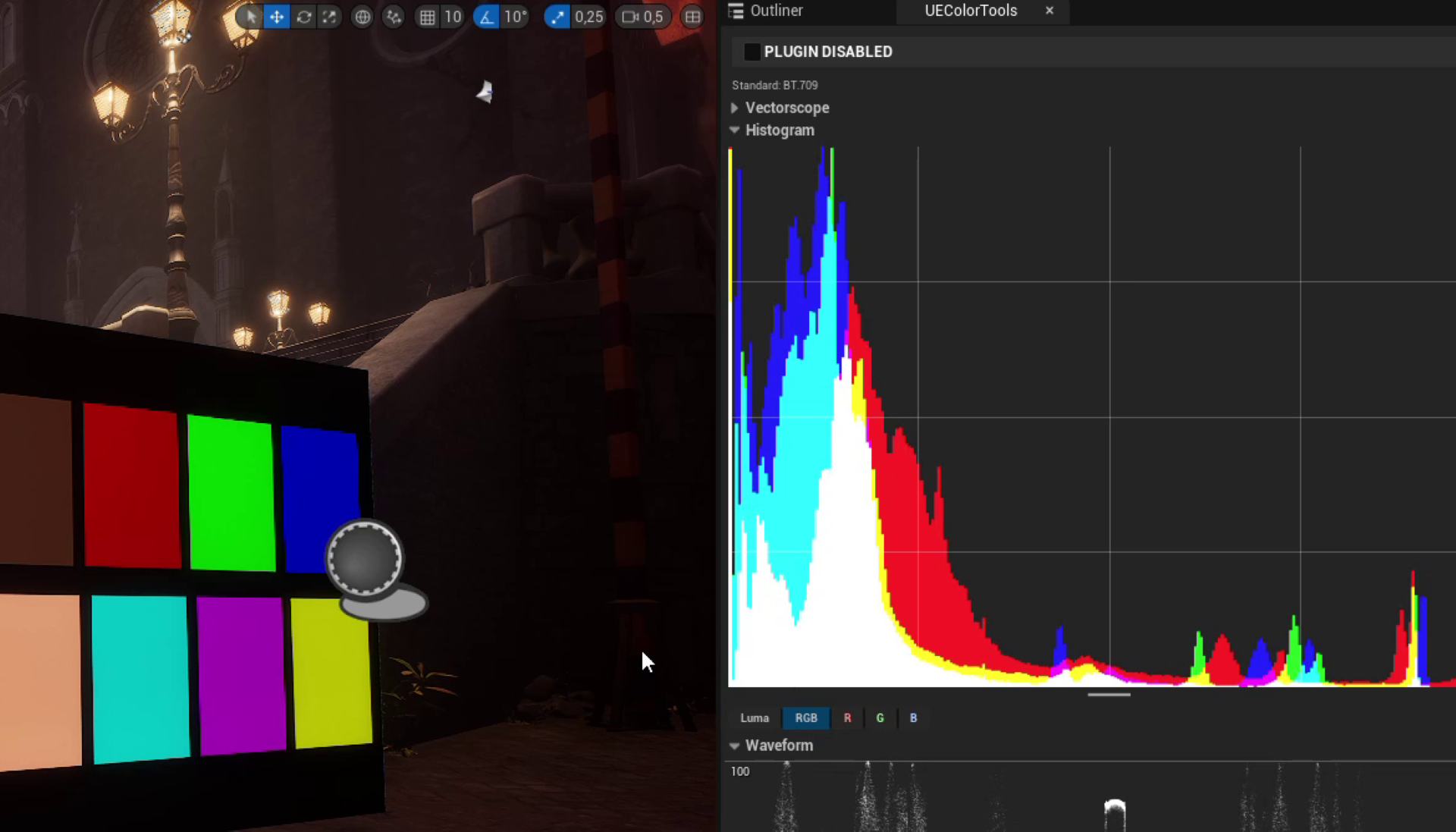
The histogram is the simplest of the three because it has no 2D accumulation. It is a 1D array of bin counts. Instead of textures I use two RWStructuredBuffer<uint>s: a 1024-entry accumulation buffer (256 bins x 4 channels, laid out as channel * 256 + bin) and a 4-entry max buffer (one per channel).
Pass 1: HistogramScreenCS: every viewport pixel computes its bin and increments. There is no spatial output yet, just bin counts.
uint CalculateBinIndex(float InValue, uint InChannelOffset)
{
    uint BinIndex = uint(saturate(InValue) * (HISTOGRAM_BIN_COUNT - 1));
    return BinIndex + InChannelOffset * HISTOGRAM_BIN_COUNT;
}
The view-type system decides which channels to accumulate. In Luma mode all three RGB writes use the same luma value. In RGB mode each channel uses its own. In single-channel modes only one of the four writes fires.
Pass 2: HistogramMaxCS: dispatched as a single threadgroup with numthreads(1, 1, 1). One thread walks all 256 bins per channel and writes the max into the second buffer. Doing this on the GPU rather than reading the bins back to the CPU keeps the data resident and avoids the read-back latency that would otherwise stall the frame:
[numthreads(1, 1, 1)]
void HistogramMaxCS(uint3 DispatchThreadID : SV_DispatchThreadID)
{
    for (uint Channel = 0; Channel < 4; Channel++)
    {
        uint MaxValue = 0;
        uint ChannelOffset = Channel * HISTOGRAM_BIN_COUNT;
        for (uint Bin = 0; Bin < HISTOGRAM_BIN_COUNT; Bin++)
            MaxValue = max(MaxValue, AccumulationBuffer[ChannelOffset + Bin]);
        MaxBuffer[Channel] = MaxValue;
    }
}
A parallel reduction would be faster, but for 256 bins serial is fine and the code is one screen tall. Pick your battles.
Pass 3: HistogramCS: Dispatched over the output texture, one thread per output pixel. Each thread maps its X to a bin, reads the count for its channel(s), divides by the max for that channel, and decides whether its Y is below the resulting bar height. No atomics, just reads:
float HeightFromBottom = 1.0 - UV.y;
if (MaxR > 0 && HeightFromBottom <= (float(CountR) / MaxR))
    OutColor.r = 1.0;
That divide by max is what makes both bright scenes and dark scenes legible.
Waveform#
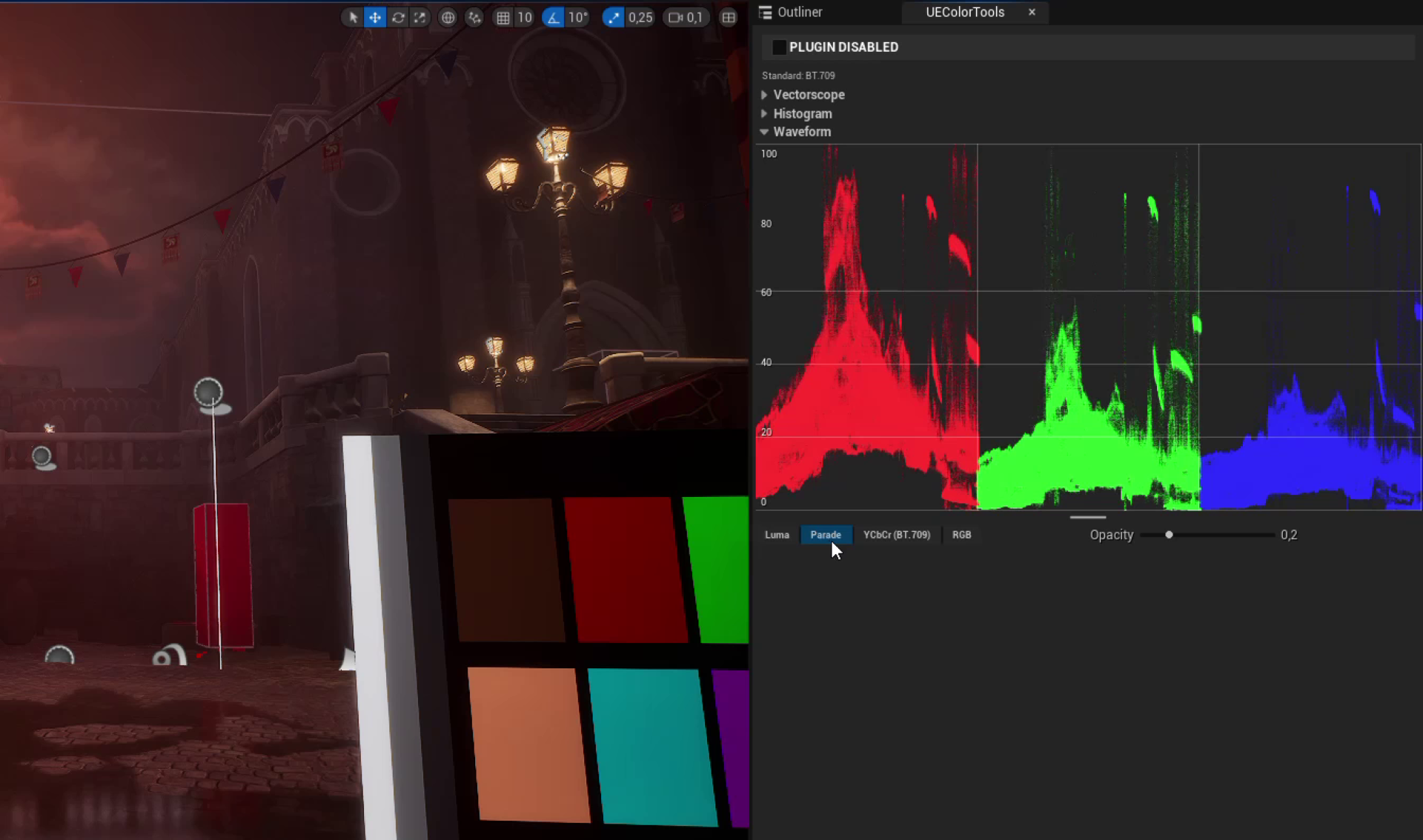
The waveform reuses a similar algorithm to the vectorscope. Same PF_R32_UINT per-channel textures, same atomic add with the saturation guard, same Reinhard alpha compression, same Slate gamma compensation. What changes is the mapping from source pixel to scope pixel, and the per-mode tinting.
In Luma mode the source (x, y) collapses to scope (x, 1 - lum). Y is thrown away, replaced by luminance:
outPx[0] = uint2(uv.x * ScreenSizeOutputX, (1 - lum) * ScreenSizeOutputY);
In RGB mode the same X gets reused for three writes stacked on top of each other, each at the per-channel value. In Parade mode the scope is split into thirds horizontally and each channel gets its own column third:
outPx[0].x = (uv.x * 0.33333) * ScreenSizeOutputX;
outPx[0].y = (1 - col.r) * ScreenSizeOutputY;
outPx[1].x = (0.3333 + uv.x * 0.33333) * ScreenSizeOutputX;
outPx[1].y = (1 - col.g) * ScreenSizeOutputY;
outPx[2].x = (0.6667 + uv.x * 0.33333) * ScreenSizeOutputX;
outPx[2].y = (1 - col.b) * ScreenSizeOutputY;
The YCbCr parade is the same layout but with a subtlety: Cb and Cr are signed, in roughly [-0.5, 0.5], so plotting them with 1 - chroma would land everything below the bottom edge. They need an offset to center on zero:
outPx[1].y = (1 - ycbcr.g - 0.5) * ScreenSizeOutputY;   // Cb centered
outPx[2].y = (1 - ycbcr.b - 0.5) * ScreenSizeOutputY;   // Cr centered
That -0.5 shift means zero chroma sits at the vertical middle of the parade strip.
The other waveform specific bit is per-channel tinting. In RGB and Parade modes each write picks a color based on its channel, slightly desaturated red/green/blue. In YCbCr mode Y gets white, Cb gets light blue, Cr gets light red, matching broadcast convention. Without tinting, the three stacked or paraded channels are indistinguishable when they overlap.
if (ViewType == 4 || ViewType == 1) {           // RGB or Parade
    if      (i == 0) { r = 1.0; g = 0.2; b = 0.2; }
    else if (i == 1) { r = 0.2; g = 1.0; b = 0.2; }
    else             { r = 0.2; g = 0.2; b = 1.0; }
}
else if (ViewType == 2) {                       // YCbCr parade
    if      (i == 0) { r = g = b = 1.0; }       // Y -> white
    else if (i == 1) { r = 0.5; g = 0.5; b = 1.0; }  // Cb -> light blue
    else             { r = 1.0; g = 0.5; b = 0.5; }  // Cr -> light red
}
The dispatch for the accumulate pass is sized to the source viewport, not the output texture, because we want one thread per source pixel. The output is 1080 * 720 but the render resolution can be anything. That decoupling is what the ScreenSizeInput* vs ScreenSizeOutput* parameters are for. Input dimensions are used to compute the normalized UV that drives the X mapping, output dimensions are the splat target.
Closing thoughts#
If I had to name the things I wish someone had told me at the start, they would be these.
- Integer accumulation textures are the trick for any heatmap style visualization on the GPU. You cannot atomic add on float, so you separate concerns: 32-bit unsigned integer atomic adds during accumulation, float normalization in a second pass.
- Guard your atomics against hot cell contention. A cheap
if (Accumulation[cell] < cap)check before everyInterlockedAddkeeps thousands of threads from serializing on the few pixels that everything maps to. SubscribeToPostProcessingPassis where you tap in, not thePreRenderhooks. Choose the pass based on what color space you want. FXAA gives you post-tonemap display referred values, which is what scopes are supposed to measure.- Slate treats
UTextureRenderTarget2Dbrushes as sRGB. Applypow(rgb, 2.2)in the final compute pass to compensate, or your reds become maroons and your colors look off in ways you can’t put a finger on. - The engine source is the manual. Half of the API I used is not in any official doc page. The fastest way to get unstuck was to grep the engine source for any sample that did something similar and there is almost always one, hidden away inside
Source/Runtime/Renderer/.
The plugin is published free on Fab if anyone wants to poke at the binary, and the source is available there. Hope this saves someone the months it took me to assemble it.
Some resources I found useful#
https://ciechanow.ski/color-spaces/
https://webgpufundamentals.org/webgpu/lessons/webgpu-compute-shaders-histogram-part-2.html
https://webgpufundamentals.org/webgpu/lessons/webgpu-compute-shaders-histogram.html
https://youtu.be/Uml0BvjraSc?si=rsvG2gvw8eUcxVsO